 how-to
How to Track a Container: 2026 Step-by-Step Guide
Table of Contents
- What You Need Before You Track a Container
- How to Track Cargo by Bill of Lading
- Step-by-Step: How to Track a Container on a Carrier Portal
- Shipping Container Transit Time and What Each Status Means
- Why Your Container Tracking Status Is Not Updating
- Freight Tracking Best Practices for E-commerce and LCL Shippers
- Frequently Asked Questions
Last Updated: October 2, 2026
What You Need Before You Track a Container
Before you can track a container, you need the right reference number and a basic understanding of the container code. Most failed tracking attempts come down to using the wrong number or misreading it.
At Freight-Calculator.com, we've watched shippers waste hours pasting booking numbers into fields that only accept container IDs. The fix is simple once you know the difference.
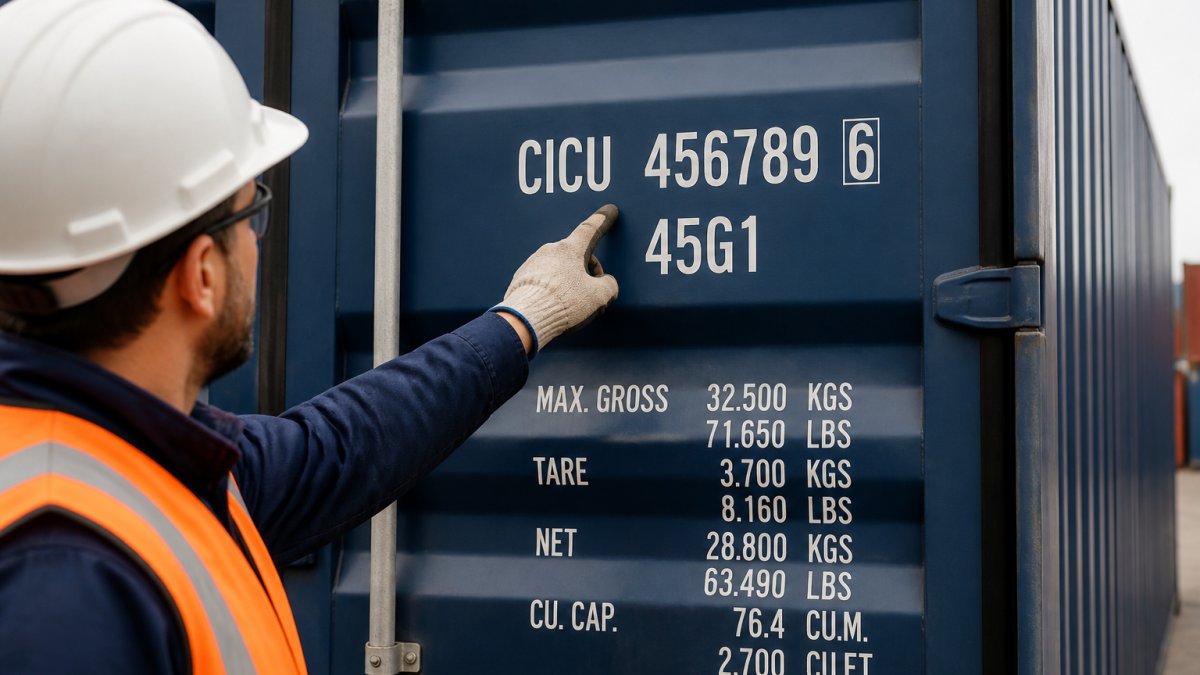
Reading a Container Number and Check Digit
A container number is a unique identifier made up of a four-letter owner prefix, a six-digit serial number, and a single check digit, following the ISO 6346 standard.
Here's how to break one down:
- First three letters: The owner prefix, identifying the shipping line or lessor
- Fourth letter: The equipment category, usually "U" for freight containers
- Next six digits: The serial number assigned to that specific box
- Final digit: The check digit, calculated from the letters and numbers before it
The check digit catches typos: mistype one character and the portal rejects your search. That's why "invalid container number" errors are so common.
Container Number vs. Bill of Lading Number
A bill of lading is the legal contract between shipper and carrier; a container number identifies the physical steel box. They are not interchangeable.
One bill of lading can cover multiple containers, and one container can appear on several bills. If you only have a booking number, use a portal that accepts booking references.
How to Track Cargo by Bill of Lading
To track cargo by bill of lading, enter the bill of lading number into your carrier's portal or a multi-carrier tool. It's typically 10-16 characters and appears on your booking confirmation and commercial invoice.
The Federal Maritime Commission's guide to ocean shipping documentation explains how bills of lading function as the core shipping document for ocean freight. Knowing which bill you hold matters.
Master Bill vs. House Bill: Which Reference Do You Use?
The master bill of lading is issued by the vessel operator to the freight forwarder; the house bill of lading is issued by the forwarder to you.
Booked direct with a shipping line? You'll have the master bill. Booked through a forwarder? You likely have a house bill.
Here's the practical rule:
| Your Situation | Reference You Have | Where to Track |
|---|---|---|
| Booked direct with carrier | Master bill of lading | Carrier portal |
| Booked via forwarder | House bill of lading | Forwarder portal or multi-carrier tool |
| Only have booking confirmation | Booking number | Carrier or forwarder portal |
If your house bill returns no results on a carrier site, that's expected.
Step-by-Step: How to Track a Container on a Carrier Portal
Tracking a container on a carrier portal takes about two minutes with the right number:
- Identify your reference type. Confirm whether you have a container number, booking number, or bill of lading number.
- Go to the carrier's tracking page. This is usually linked from your booking confirmation email.
- Select the correct search field. Most portals let you choose between container, booking, or bill of lading.
- Enter the number exactly. Container numbers have no spaces. Bill numbers may include letters.
- Submit and read the status. Note the vessel name, port of loading, and estimated time of arrival.
- Save the tracking link. Most portals generate a shareable URL you can revisit.
- Set up automated updates. Many carriers offer email or SMS alerts when status changes.
Tracking Inland and Intermodal Legs
Ocean tracking only covers the vessel voyage. Once your container discharges, it moves inland by rail or truck, and that leg often disappears from carrier tracking.
For intermodal and inland transit, you need the rail carrier's own tracking (using the container number) or a drayage provider's dispatch system. This is where visibility breaks down.
U.S. Department of Transportation freight data resources notes that intermodal movements involve multiple carriers, each with separate tracking systems, which is why end-to-end visibility remains a challenge for shippers.
Shipping Container Transit Time and What Each Status Means
Shipping container transit time is the total duration from loading at the port of loading to pickup availability at destination. Ocean transit alone runs 20-45 days depending on route; door-to-door adds inland legs and customs clearance.
Status updates follow a standard sequence, though carriers word them differently. Here's what each status means for your timeline.
Container Status Glossary
- Empty to shipper: The container is heading to the loading point. Pre-loading; your clock hasn't started.
- Gate in: The container has entered the terminal; the carrier now controls it. Expect 1-3 days before loading.
- Loaded on vessel: The container is physically on the ship. This is the start of ocean transit.
- Vessel departure: The ship has left the port of loading. Your ETA clock is now running.
- Transshipment: The container is moving between vessels at an intermediate port. The most common cause of ETA slippage, a missed connection can add 5-10 days.
- Vessel arrival: The ship has reached the port of discharge. Discharge usually follows within 24-72 hours.
- Discharged: The container has been lifted off the vessel. It's now in the terminal, waiting on customs or drayage.
- Customs hold: Clearance is pending. Nothing moves until this clears. A hold can last hours or weeks depending on the issue.
- Gate out: The container has left the terminal, usually for inland delivery. This is the handoff from ocean to inland carrier.
- Empty return: The container has been returned to the carrier after unpacking. Your shipment is complete.
How Long Each Status Should Last
Containers typically sit in each status for a predictable window. If it exceeds that window, something is off:
| Status | Typical Duration | Red Flag If Longer Than |
|---|---|---|
| Gate in to loaded | 1-3 days | 5 days |
| Loaded to departure | 0-2 days | 3 days |
| Vessel departure to arrival | 20-45 days (route-dependent) | Route estimate + 7 days |
| Arrival to discharged | 24-72 hours | 4 days |
| Discharged to gate out | 2-7 days (customs-dependent) | 10 days |
| Gate out to empty return | 3-10 days | 14 days |
If your status sits on "customs hold" or "transshipment" for days, that's normal. If it sits on "loaded on vessel" for two weeks, something is wrong.
Reading the Timeline, Not Just the Status
The status alone doesn't tell you if you're on track, you need the event timestamp. "Vessel departure" from three weeks ago on a 25-day route is fine; the same status from six weeks ago is not.
Compare the timestamp to the route's typical transit time and your ETA. If the gap exceeds the red-flag window above, contact your forwarder or carrier with the container number and last known event, faster than refreshing the portal.
Why Your Container Tracking Status Is Not Updating
A tracking status stops updating for one of four reasons: the carrier data feed lagged, the container moved to a leg not covered by that portal, the reference number is wrong, or the shipment is genuinely delayed.
Carrier data feeds update from real-time to once every 24 hours, so a container can be moving while the portal shows the last port event. That gap is normal, up to a point.
The Data-Feed Lag: Why Portals Fall Behind
Tracking data moves through a chain: the terminal records the event, the carrier ingests it, and the portal pulls from the carrier. Each handoff adds delay.
The practical rule: if the last event is less than 24 hours old, don't worry. If it's been more than 48 hours with no change and the container should be moving, start diagnosing.
The Diagnostic Sequence
When a status freezes, work through these steps in order. Stop when you find the answer.
- Check the timestamp, not just the status. A status with no timestamp is useless. Find the last event time and compare it to today.
- Confirm the reference number is correct. Re-read it character by character against your booking confirmation. See the invalid-number checklist below.
- Try a second portal. If the carrier portal shows nothing new, try a multi-carrier tool or your forwarder's portal. Different portals pull from different feeds.
- Check the vessel's own schedule. The carrier's vessel schedule page often shows the ship's current position and next port, even when container-level events lag.
- Check for a customs hold. A hold won't always appear as a status change. Call the carrier or your customs broker to confirm.
- Contact your forwarder. If steps 1-5 don't explain it, the forwarder can query the carrier directly.
Fixing Invalid Container Numbers
If the portal rejects your container number as invalid, work through this checklist:
- Confirm you have all 11 characters: four letters plus seven digits
- Check for lookalike characters: zero vs. letter O, one vs. letter I
- Remove any spaces or hyphens
- Verify the check digit by recalculating it from the prefix and serial
- Confirm the container prefix belongs to a real owner (some prefixes are retired)
- Try the booking number or bill of lading instead
Most "invalid" errors are typos. A few are retired prefixes from containers that have been renumbered or scrapped.
When the Problem Is Real
If the container number is valid, the timestamp is stale beyond the red-flag window, and no portal shows movement, the shipment is likely delayed, from missed transshipment connections, port congestion, equipment shortages, or weather. The portal won't help; you need a human at the carrier or forwarder who can see the internal event log.
Freight Tracking Best Practices for E-commerce and LCL Shippers
Freight tracking best practices for smaller shippers come down to three habits: track by multiple references, set up automated updates, and don't rely on one portal.
E-commerce sellers moving LCL (less than container load) cargo face a specific problem: LCL shipments are consolidated, so your cargo shares a container with other shippers' goods, and the container number on your paperwork may not correspond to a container you can track directly.
Mobile App vs. Web Tracking
Carrier mobile apps offer push notifications and often update faster than web portals, which give more detail per event and are easier to share with your team.
For a single shipment, a mobile app is fine. For a team managing multiple shipments, a web-based tracking tool that aggregates carriers is more practical. You get one dashboard instead of ten browser tabs.
Security and Privacy in Tracking
Tracking portals expose your shipment details to anyone who has the reference number. A container number is not a secret. Anyone who sees it on a bill of lading or a photo of the box can look up your cargo's location, vessel, and ETA.
Some shippers share only the tracking link rather than the raw reference number, or use forwarder portals that require login to limit casual lookups.
CISA guidance on protecting supply chain data recommends treating shipment reference numbers as sensitive business information and limiting how widely they're shared.
Freight-Calculator.com keeps your shipment data private and never sells or shares it with competitors, which matters when you're moving cargo in a competitive market.
Tracking a container shouldn't require a logistics degree, but it does require the right reference number and a portal that covers every leg of the journey. Freight-Calculator.com offers instant international shipping rates in under 30 seconds, no registration required, and full visibility of landed cost components in one interface. As a licensed and bonded NVOCC and TSA-approved forwarder with 35 years of logistics experience, we handle the calculation through shipment coordination. Get started with Freight-Calculator.com and see your routes, equipment, and sailing schedules side by side before you book.
Frequently Asked Questions
How can I track the status of my container?
Enter the container number (four-letter prefix plus seven digits) or your bill of lading number on the shipping line's tracking portal. You will see the current shipment status, vessel name, port of loading, port of discharge, and estimated time of arrival. For inland legs, use the intermodal rail or trucking reference. If you booked through a freight forwarder, they can pull the same data and share it with you directly.
What is the difference between a container number and a bill of lading number?
A container number identifies the physical steel box and stays the same for its entire life. A bill of lading number identifies the contract of carriage for one specific shipment and changes with every booking. Use the container number to see where the box is right now. Use the bill of lading number to see the full shipment record, including all containers, the shipper, the consignee, and the cargo description.
Why is my container tracking status not updating?
Status gaps usually mean the box is mid-ocean with no port event to report, or the vessel has not yet been discharged. Carriers also batch-update milestones, so a 24 to 48 hour lag is normal. Check that your container number passes the check digit test first; one wrong character returns no results. If the vessel name changed due to a transshipment, query the new vessel and voyage number instead.
How often should I check my container's location?
Once a day is enough for ocean transit legs, and twice a day once the vessel is within three days of the port of discharge. Set automated updates from the carrier or your forwarder so you are alerted to key events like discharge, customs hold, or inland dispatch. Checking every hour does not surface new data because carriers only publish events when they actually happen at the terminal or on the vessel.